QR code menus: why a PDF isn't enough
A QR code that opens a PDF is just the printed menu squeezed onto a phone: you pinch to read it, you can't filter it and it goes stale with every price change. What we learned building the menu for Püria, a café in Santiago de Chile.
A QR code that opens a PDF isn't a digital menu. It's the printed menu squeezed onto a phone: you pinch to read it, you can't search or filter it, and every price change means someone has to edit the file and upload it again. A proper digital menu is a web page built for a phone screen, one the restaurant's own team can update in a minute. That's what we built for Püria, a speciality coffee and brunch spot in Las Condes, Santiago de Chile. Here's what we learned.
The starting point will sound familiar. Püria's menu lived on a third-party platform, in Spanish only, and every change depended on someone else. What they wanted was simple enough: a menu of their own, in their brand and on their domain, that they could look after themselves. Add a new croissant, mark a dish as sold out, change a price. Without emailing anyone.
That's exactly where a PDF lets you down. A document laid out for an A4 sheet ends up on a six-inch screen, in small print, scrolling both ways. Anyone avoiding gluten has to read the whole thing to find what they can order. Anyone who doesn't speak Spanish needs a second PDF, which rarely exists. And the file is out of date the day the price of milk goes up.
- Readable with one hand Püria's menu is split into three sections (Coffee, Kitchen and Sweet), with the categories always in view at the top and a search behind the magnifying glass. No sideways scrolling, no pinching: every dish is a row or a card with its photo, name and price.
- Filters that actually help Five dietary filters you can combine: vegan, vegetarian, gluten-free, dairy-free and sugar-free. A vegan coeliac ticks both and sees only what they can order. A PDF will never manage that.
- A page for every dish Tap a dish and its page opens: photo, description, ingredients, portion and what it goes well with. Every dish has its own link, so it can be sent on WhatsApp or shared from the button on the page.
- Two languages, one menu Spanish and English, with a switch at the top. It's the same menu with the same prices: the English copy sits alongside the Spanish on every dish, so there's no second file to fall behind.
- Tell people whether you're open Right at the top, the menu says "Open now, closes at..." worked out on Santiago time rather than the time on the visitor's phone. It takes special opening days and one-off closures into account, which the team sets from the same editor.
The most important part of a digital menu is the bit nobody sees: who changes it, and how long it takes. A menu that isn't kept up to date turns back into a PDF the moment prices change. So we built Püria its own editor. The team signs in with their email and a six-digit code, no passwords. They see the menu laid out by section and category, open a dish and change whatever needs changing: photo, price, description, English copy, sold out. When they publish, the change is live within a few minutes.
Using it day to day brought up things a real menu needs. A way to hide a dish, handy for adding a new one before the price is settled and showing it once it is. A "What we'd recommend" block with up to three dishes and start and end dates, so this week's recommendation doesn't linger for a month. A note per category, for offers that cover several dishes at once. And the opening hours, exceptions included, edited from the same place.
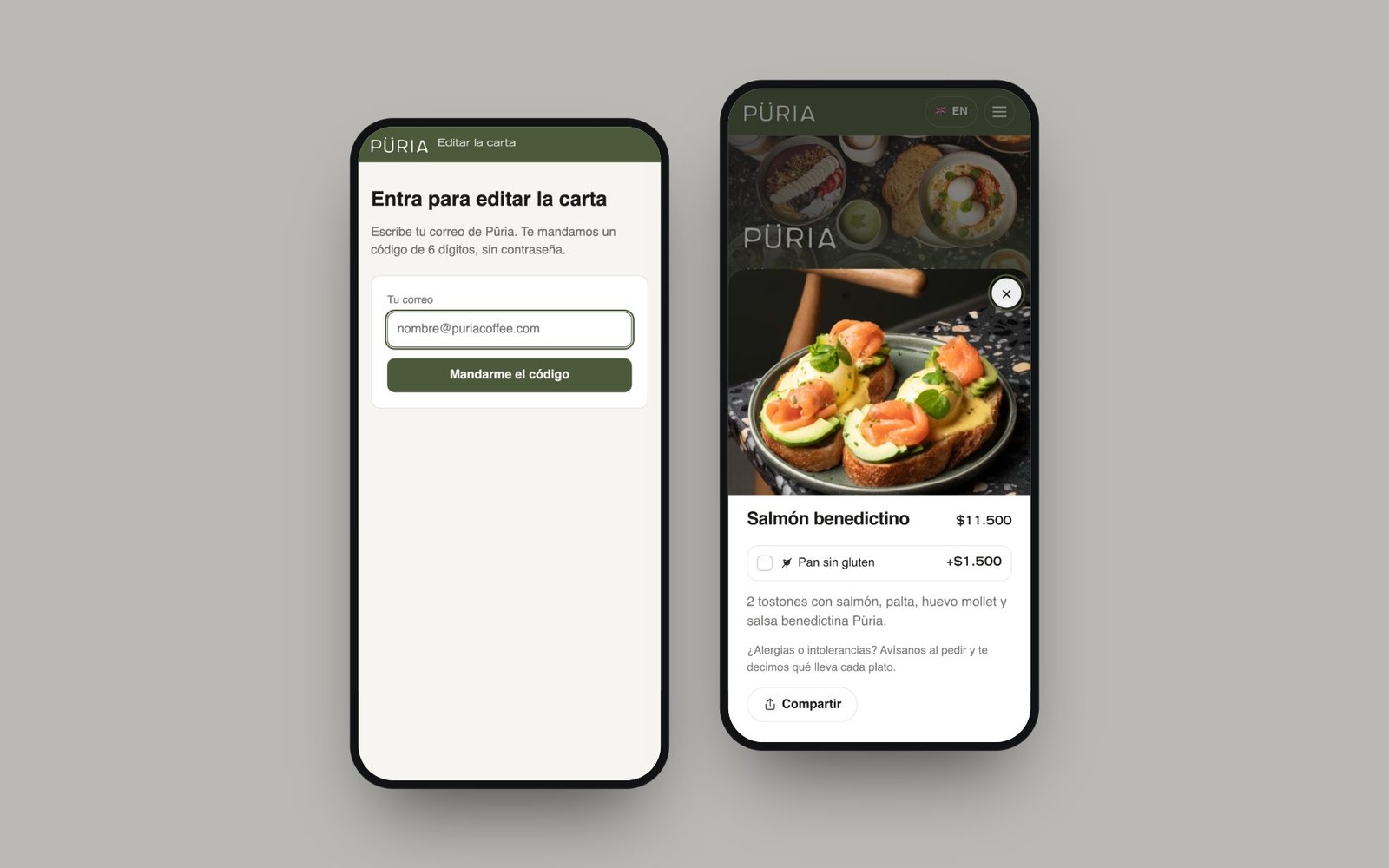
We learned one lesson with the first new photo the team uploaded. Menu photos were cached in the browser for a year, so the menu would load quickly. But the editor showed the new photo before the site had finished publishing, the browser asked for it, got an error and held on to that error. We fixed it in three ways: the editor shows its local copy of whatever was just published, photos are now cached for a day rather than a year, and every new photo carries a timestamp in its file name. On a menu that changes often, caching photos for a long time is a trap.
The other lesson is about the QR code itself. A printed code points to one address for ever: if that address changes, the sticker on the door is useless. Püria's points to puriacoffee.com/menu, a short address they own, which redirects to the menu. If the menu ever moves, you change the redirect and the sticker keeps working. Never print the address of a platform you don't control.
If you run a café or restaurant with a QR code that opens a PDF, ask yourself three questions. Can it be read on a phone without pinching? Could you change a price today, yourself, from your phone? Is the address in the QR code yours? If any answer is no, your menu is working against you. You can see how Püria's turned out at puriacoffee.com/carta, or read the full case study, and if you'd like one like it for your place, get in touch.